

Last updated: November 20, 2026
Most Wealthy Affiliate reviews land in one of two places. Some call it a scam, and others promise it will hand you an online income while an AI does the work. Neither is true, and the second one costs more to believe.
Here is the short answer. Wealthy Affiliate is a legitimate platform for building an online business. In October 2026 it replaced its whole platform with a new one built around an AI assistant called Ace, and you can now start free, with no credit card, and try everything the platform offers before you pay anything.
I joined in January 2016, I’m still a member, and I use the new platform on my own business. Full disclosure before the first link: if you join through this page and later move to a paid plan, I earn a commission. Starting free earns me nothing, and everything below would read the same either way.
Quick Navigation
How the New Wealthy Affiliate Works
The old Wealthy Affiliate was a training library with tools built around it. The new one is built around a plan. You sign up with your first name and email, or with your Google login, and the next screen asks one question: what will your first Hub be about? A single word or a short phrase is enough, and you can change it later.
Once you’re inside, the pieces fit together like this:
- A Hub holds one business. It keeps the topic, the audience, the goals and the voice of that business in one place, so Ace doesn’t need the whole story again every time you come back. The free account gets one Hub, and paying members can run more than one business, each in its own Hub.
- Each Hub has channels, such as a website or a YouTube channel, and each channel gets a gameplan. The gameplan lists the steps in order and shows what each step will cost before you start it.
- Ace is the assistant that sits beside everything. You can ask it what to do next, ask it to explain something, or have it fill in the parts of your Hub you skipped.
- The Writer drafts articles and pages and publishes them straight to your website. The Artist makes logos, blog covers and YouTube thumbnails.
- Every account includes hosting for a WordPress website, the most widely used website software there is. You get full admin access, so you’re working on a regular WordPress site you can take with you, not a locked-in page builder. Each website also comes with two email accounts.
- The community is still there, with free live classes and replays on every plan, and live chat day or night with the founders, Kyle and Carson, part of it.
On the old platform, your membership bought you access. On the new one, every plan gets the same tools, and what changes from plan to plan is mainly how many credits you get each month and how many websites you can run. Credits pay for anything the AI makes, including every reply Ace gives you. Anything you do by hand is free, such as editing an article yourself or pressing publish. So credits are what you’re really paying for, and it helps to know what things cost before you start.
What a Brand-New Free Account Gets You
To show what a new member actually gets, I opened a free account in November 2026, picked a hobby topic (retro computing) and followed the gameplan one step at a time.
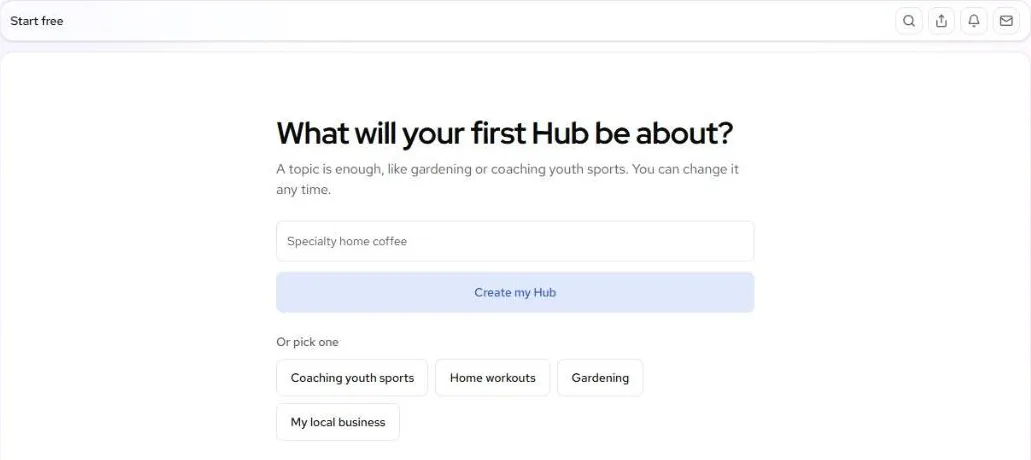
The account opened with the full 4,000 credits. Creating the Hub took a few seconds and 10 credits. It filled in the topic and listed what was still missing (who the site is for, how it will make money, your voice and your goal) with a button to finish those with Ace. A short five-step tour then walks you through the screen, and it’s worth the minute it takes.
The gameplan had seven steps. Setting up the website and making a logo came first, then five pieces for the Writer: a homepage, an about page and three articles, each marked “about 800 credits.”
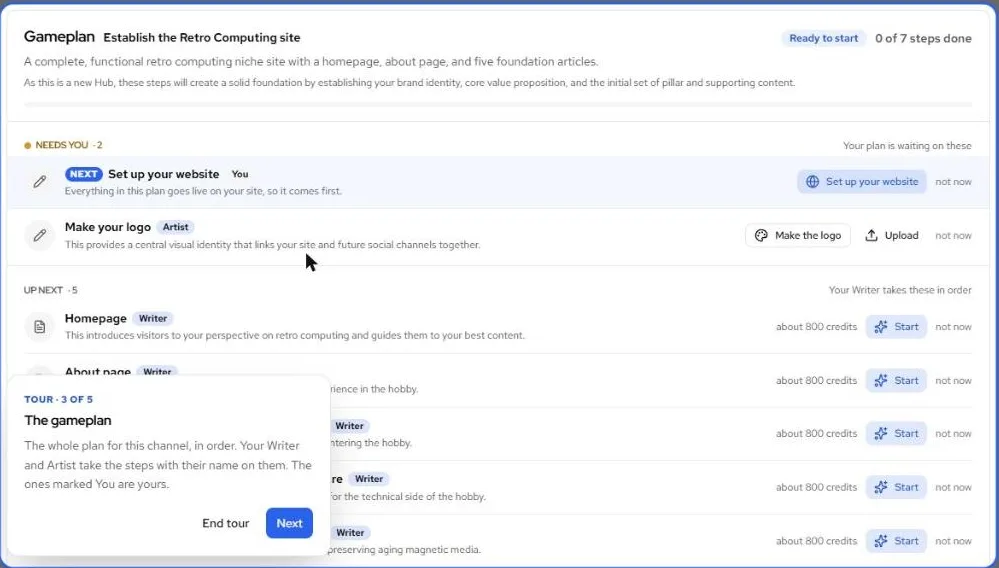
Here is what each step actually cost:
- The website: 1 credit. Wealthy Affiliate suggested five free siterubix.com addresses that were already checked and available, plus paid domains starting at $22.99 a year. I took a free one and a standard WordPress theme, and the site was live in about a minute.
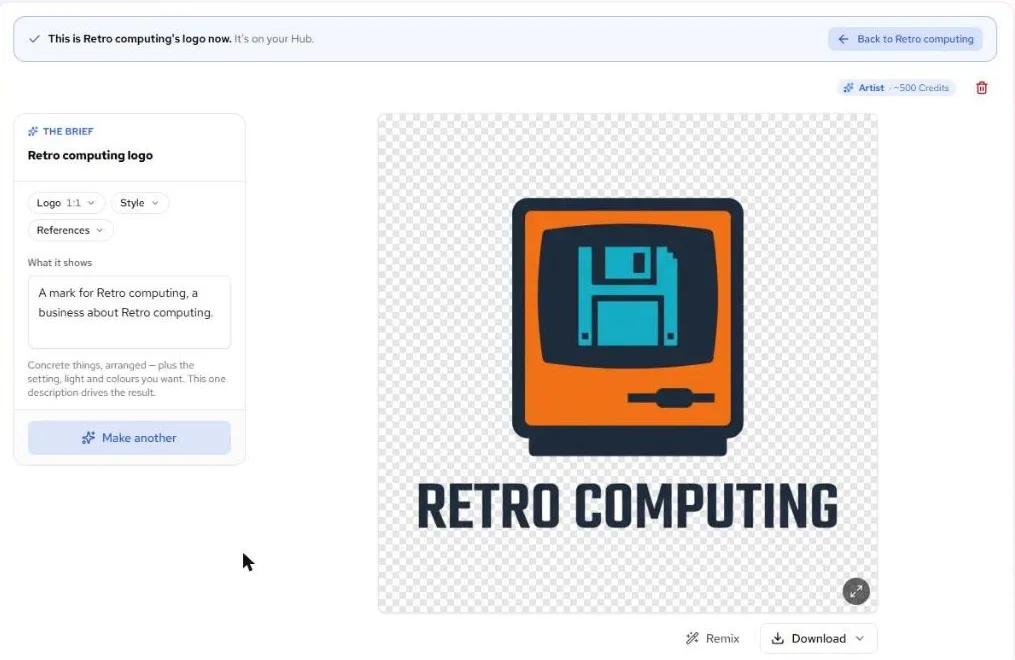
- The logo: 338 credits, against an estimate of about 500. You pick from three styles (symbol with text, text only, or symbol only) and a background, and the Artist does the rest.
- The homepage: 520 credits for 964 words. The gameplan said about 800, and the Writer’s own screen said about 1,000. Writing the plan for the page cost nothing, and neither did publishing it.
All of that used 869 of the 4,000 free credits, about 22 percent. Every step came in under its estimate, which beats the other way around, but it does mean the estimates are a rough guide rather than a price list.
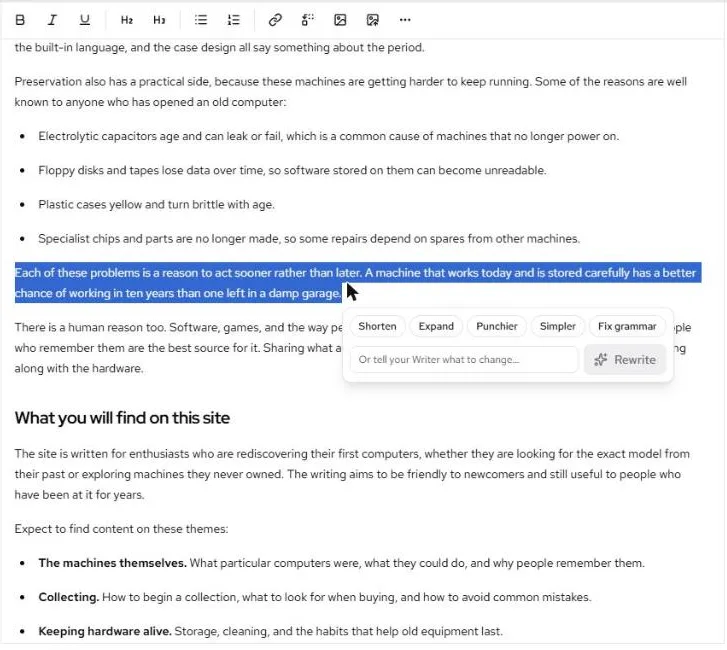
The Writer has improved. You choose a length up front (short at about 800 words, standard at about 1,500, or a deep dive at about 2,500), and a checklist beside the draft tracks the title, the search description, the page address and the length as it writes. Once the draft is done, you can select any paragraph and ask for it shorter, longer, punchier or simpler, or have the grammar fixed. Those buttons cost credits, and on an earlier test account, asking the Writer to fix two sections of an article cost 267 credits, nearly as much as writing the whole article. If you only need to change a sentence or two, type it yourself, which costs nothing.
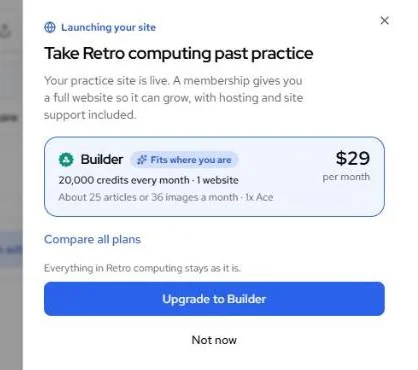
Two moments are worth knowing about before you start. The first came when my free site went live: a panel slid in right away offering the $29 a month Builder plan. “Not now” closes it and nothing changes, and despite the timing, the free account is nowhere near used up.
The second is where a beginner needs to slow down. The gameplan marked the homepage step done, but the page the Writer made wasn’t the site’s front page. It was published as a separate page called “Homepage,” linked in the menu. Anyone visiting the site still landed on the standard blog list, with WordPress’s sample “Hello world!” post on it and a second welcome post that came with the site. The new logo appeared inside Wealthy Affiliate but not on the website itself, and the page ended with “Read my guide on the essentials for starting a collection,” pointing to a guide that doesn’t exist. While all this was going on, Ace’s catch-up note said the plan was at 0 of 7 steps, while the gameplan beside it said 2 of 7.
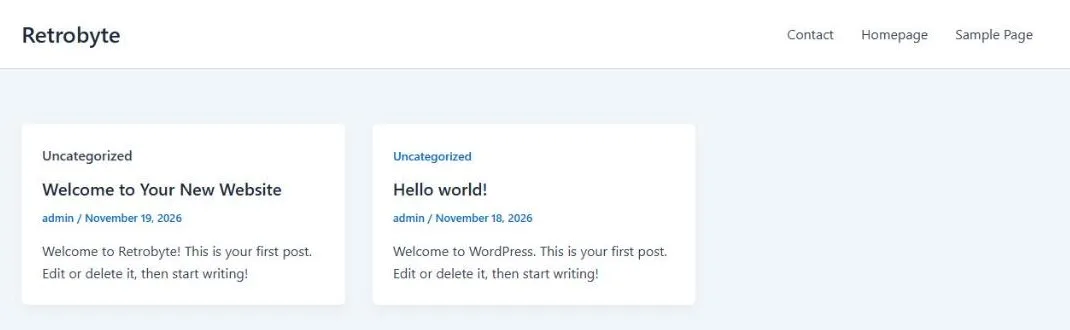
None of that is hard to fix if you know WordPress. If you don’t, ask Ace or the live chat how to set a page as your site’s front page and how to remove the sample post, and check your live site in a regular browser after every step the gameplan calls done.
What Ace Gets Right, and Where It Slips
I’ve spent a lot of time with Ace on my own business since the relaunch, giving it the kind of jobs any site owner would. It did better than I expected in most places, and worse in the one place a beginner is most likely to trust it.
Here is where it earned its keep:
- Its strategy advice started out generic, the same suggestions anyone would get. Once I told it what I had already tried and what had happened, the advice became specific to my situation and worth reading.
- It won’t invent numbers it can’t see. Google offers a free tool called Search Console that shows how often your site appears in Google’s results and how many people click through to it. I asked Ace about my Google traffic before connecting that account, and instead of making up figures, it told me it had no access to that data.
- Give it real numbers and it reads them well. I pasted in my own Search Console figures, and it spotted that most of the times my site showed up in Google came from a single page, and that my pages sat too far down the results for people to click on them. It was exactly right.
- When it cut a corner, it admitted it. I asked it to pick three articles from my site for an email. It first chose from the titles alone, told me so without being asked, then went back, read the pages, and came back with three correct links.
The weak spot is writing in your voice. Ask Ace for a short email to your readers and you get generic copy with made-up details in it, such as readers “telling” you things they never said, or experiences you never had, written as if they were yours. The Writer can do the same thing on a technical topic, putting steps in the wrong order or skipping the detail an expert would never leave out, and it sounds just as confident either way. Your name goes on whatever you publish, so checking every line is your job.
Time with Ace adds up, too. One long stretch of steady use on my own business cost about 3,300 credits. Single replies ran anywhere from about 20 to 400 credits depending on the work involved, and asking Ace to read a web page cost between 50 and 300. For scale, the Builder plan’s 20,000 monthly credits would cover about six sessions like that, before any articles get written.
What It Costs, From Free to Premium Plus+
The free account is called Starter, and it gives you the same tools paying members get. The limits are on volume. You get 4,000 credits once, they never expire, Ace answers up to 20 messages a day, and your website lives on a free siterubix.com practice address. Based on what my test site cost, that covers a site, a logo and roughly half a dozen pages the length of my homepage, which is enough to find out whether you like the work before you spend anything.
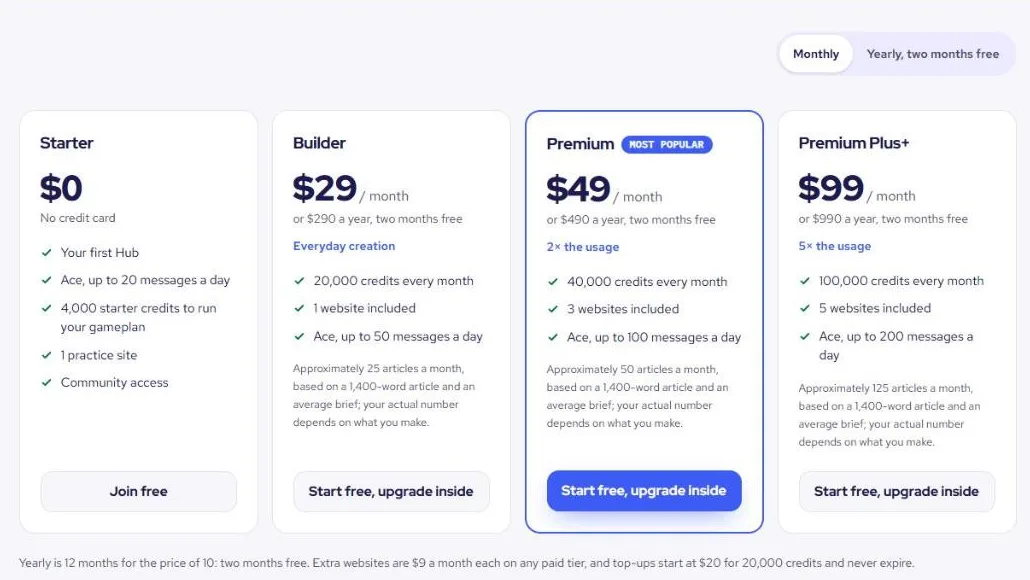
| Plan | Price | Credits | Websites | Ace messages per day | Articles (Wealthy Affiliate’s estimate) |
|---|---|---|---|---|---|
| Starter | Free | 4,000 one time | 1 practice site | 20 | A few to start |
| Builder | $29 a month or $290 a year | 20,000 a month | 1 | 50 | About 25 a month |
| Premium | $49 a month or $490 a year | 40,000 a month | 3 | 100 | About 50 a month |
| Premium Plus+ | $99 a month or $990 a year | 100,000 a month | 5 | 200 | About 125 a month |
Wealthy Affiliate’s article estimates are based on a 1,400 word article. Paying yearly gets you two months free, and extra websites cost $9 a month each on any paid plan. If you run short of credits, top-ups cost $10 for every 10,000 credits, with a $20 minimum. One detail is easy to miss: a paid plan’s credits refresh every month, and whatever you don’t use expires, even on a yearly plan. Top-up credits and the free 4,000 never expire, which matters if you work in bursts rather than every week.
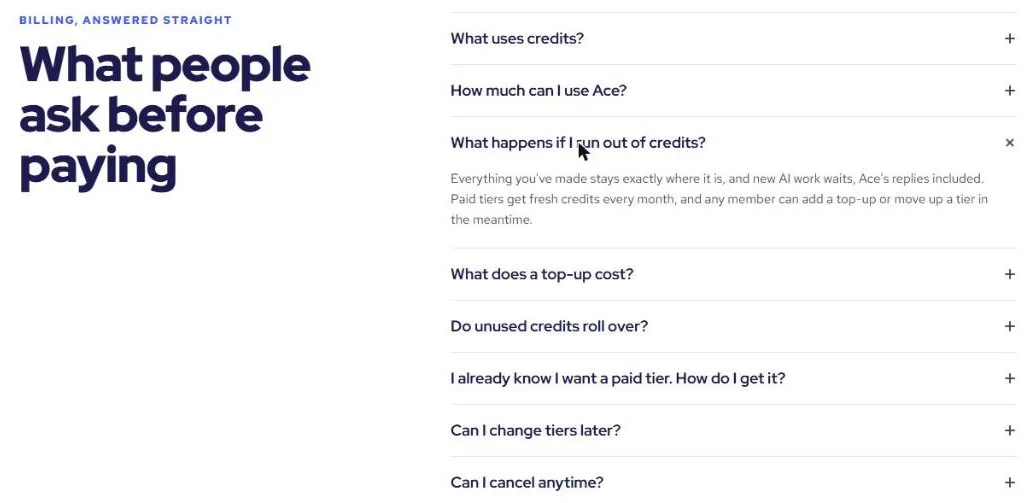
When you run out, nothing you built disappears. Everything you’ve made stays where it is, and new AI work simply waits until you add credits or move up a plan.
Builder is the plan most beginners should look at first. One website and 20,000 credits a month covers someone publishing a couple of articles a week, as long as they don’t spend half the month chatting with Ace. Premium makes sense once you are running more than one site, and Premium Plus+ is for someone producing a lot of content across several sites, which a beginner rarely needs.
You can move up a plan at any time and the change takes effect right away. Moving down or cancelling takes effect at the end of the period you have already paid for. Refunds are another matter. Wealthy Affiliate only gives one when something has gone wrong with your account or your billing, and a business that didn’t work out doesn’t qualify. That is one more reason to use the free account first.
Wealthy Affiliate makes no income promises either. Its homepage says building a real business takes real work and time, and that anyone who promises income “is selling something.” I agree, and I would add that some businesses never make money at all.
Who It Suits, and Who Should Leave It Alone
The free start changes the first question. You no longer have to decide whether you can afford a membership before you know whether you like the work. You can find that out first, then decide whether a paid plan is worth it.
Wealthy Affiliate suits a beginner who wants everything in one place: a plan, an assistant that remembers the business, a website, writing tools and people to ask. If you don’t know what hosting is or where to start, that structure is worth a lot. It’s the same reason the platform made sense to me in 2016, when I still didn’t know much about building an online business.
It is a weaker fit for someone who already runs a website with their own hosting, tools and process. Ace is built to guide newcomers, and an experienced site owner will hear a lot of advice they already know until they give it their history. It is also the wrong place for anyone who needs income in the next few months, or who expects the AI to pick the market, write everything and bring in the readers. As my test site showed, a step marked done isn’t always done, and the writing is the part you can least afford to hand over.
My History With Wealthy Affiliate, and Where I Fit In
I started affiliate marketing in 2014 and joined Wealthy Affiliate in 2016. In 2018 I started Grateful Affiliate and built it the way the training taught at the time: honest product reviews, written by me, around 500 posts. It earned commissions for years.
Then Google’s 2023 and 2024 updates buried a whole category of review sites, honest ones included, and mine went with them. I hadn’t cut corners. I had built the whole business on rankings I didn’t own, and the rules changed under me. The lesson I carry now is that rankings are rented, and the only thing that is really yours is the trust you build directly with people.
No platform can build that trust for you, the new Wealthy Affiliate included. Ace can help you build a site and fill it with articles much faster than I ever could, but it can’t make people find it, trust it or buy through it. Plan from the start for at least one way to reach readers that doesn’t depend on Google, such as an email list, video or a community where your audience already spends time.
If you join through my link, you’ll get a short welcome message from me inside the platform, and you can reply to it whenever you need a second opinion on direction, content or whether something is worth your time. Wealthy Affiliate’s own support team handles anything technical or account related.
Starting free costs nothing and commits you to nothing. Set up a Hub, follow the first few steps of the gameplan, and publish something you wrote and checked yourself. Within a few weeks you’ll know whether this is work you want to keep doing, without having spent a dollar. If it isn’t for you, close the tab and keep your money. That is the same advice I would give someone in my own family.
Affiliate disclosure: I am a Wealthy Affiliate member and affiliate. If you join through my link and later upgrade to a paid plan, I may earn a recurring commission at no extra cost to you. My recommendations and warnings stay the same whether you join or not. Wealthy Affiliate updates its platform almost every day, so some screens, credit costs and features may look different by the time you read this. Prices and plan details were checked on Wealthy Affiliate’s pricing page and homepage on November 19, 2026.
Related Guides
- How to Actually Research an Online Business Idea Using AI Before You Spend Anything: Test the audience, problem, competition and business model before paying for any platform.
- What AI Can Actually Help You Build Online (And What It Still Can’t): See where AI saves time and where your judgment, experience and audience still matter.
- When Using AI for Your Online Business Backfires: Recognize the patterns that turn faster production into more content without a working business underneath it.